
Linux shell 脚本
Published:
在这里不区分命令和脚本的区别了,因为命令是脚本的基础。
文件命名
linux 文件名不能有空格, 如果有空格需要用”“或’‘括起来。比如’Good luck.csv’
变量
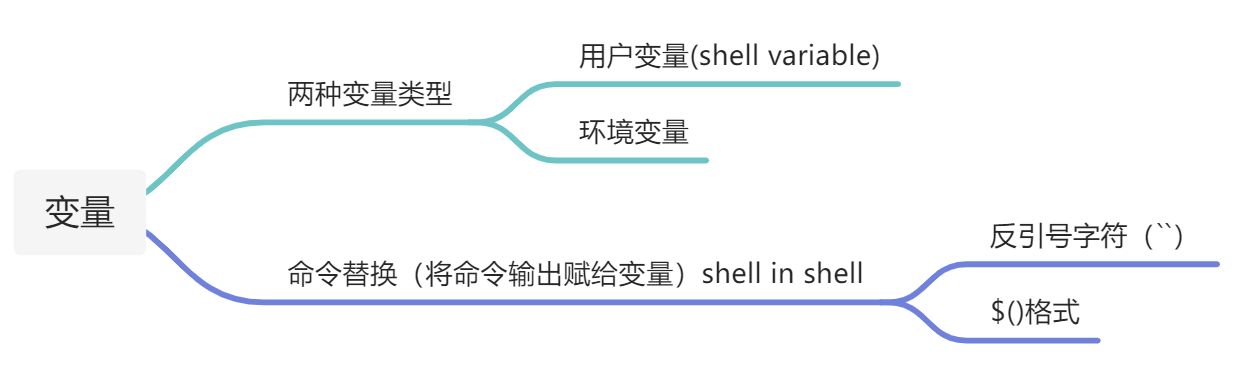 环境变量通常都是大写的, set能够打印所有的环境变量。 在bash中给变量命名一定要注意不能有空格。
单引号中的所有内容都会被shell从字面上解读。双引号中的内容除$和``外被shell从字面上解读。
数字计算
expr
expr不能计算小数
bc
通过管道的形式使用bc,避免打开计算器
echo "5+7.5" | bc
数组
创建数组
1,只声明不赋值
declare -a my_first_array
2, 创建并且赋值
my_first_array=(1 2 3)
注意等号两侧不要有空格,数字之间不要用逗号隔开。
数组的索引
可以通过array[@]获取数组的所有元素,注意要在数组名外边使用大括弧。
my_array=(1 3 5 2)
echo ${my_array[@]}
可以使用#array[@]获得数组的长度
echo ${#my_array[@]}
bash数组索引跟python相同从0开始
my_first_array=(15 20 300 42)
echo ${my_first_array[2]}
改变数组中某个元素的值
my_first_array[0]=999
数组的切片
array[@]:N:M,N表示起始索引,M表示元素的个数
增加数组的元素
array+=(elements),如果忘了括弧会给第一个元素增加element
Associative array(字典)
- 通过键-值对组织数据
- 类似于python的字典
声明字典并赋值
declare -A city_details=([city_name]="New York" [population]=14000000)
索引
echo ${city_details[city_name]}
获得字典的所有键
echo ${!city_details[@]}
IF ELSE 判断
标准形式:
if [CONDITION]; then
# SOME CODE
else
# SOME OTHER CODE
fi
如果if判断条件中有算术运算用双括弧括起来或者还是用中括弧但是使用算术标记符:
x=10
if (($x > 5)); then
    echo "$x is more than 5!"
fi
或者:
x=10
if [$x -gt 5]; then
    echo "$x is more than 5!"
fi
算术标记符: -eq ** equal to **-ne not equal to -lt less than -le less than or equal to -gt greater than -ge greater than or equal to 多重条件判断: 使用 && ||
CASE
基本结构
case MATCHVAR in
  PATTERN1)
  COMMAND1;;
  PATTERN2)
  COMMAND2;;
  *)
  DEFAULT COMMAND;;
esac
函数
bash中默认变量是全局性的
获取返回值
使用$?捕获返回值 使用echo打印返回值
给函数传参
$1 $2获得函数的第一个参数和第二个参数 $@ @* 获得函数的所有参数 $# 获得参数的个数
定时运行脚本
cron
用户输入
### 
位置参数
$@ $* 表示传给脚本的所有命令行参数 $0是程序名,$1是第一个参数,$2是第二个参数……以此类推 $# 表示参数的个数
字符串中使用变量
下边脚本中第8行’(0 0 $degree)’ 是字符串,这种写法没有将degree替换为脚本的第三个位置参数,会报错。
#!/bin/bash
# copyright@lbteng goldwind
# This script rotate .stl file counterclockwise  by  specified degree
# usage: ./rotate-stl.sh original_file target_file degree
origin_file=$1
target_file=$2
degree=$3
surfaceTransformPoints -rollPitchYaw '(0 0 $degree)' $origin_file $target_file
echo Finish rotating.
错误为:
--> FOAM FATAL IO ERROR:
wrong token type - expected Scalar, found on line 0 the word '$degree'
出现上述错误的原因是,脚本没有成功解析$degree,那么,shell脚本中,怎么在字符串中传递变量呢? 分量种情况,如果字符串本身用单引号,就像上边的脚本,则需要把需要解析的变量用单引号括起来:
#!/bin/bash
# copyright@lbteng goldwind
# This script rotate .stl file counterclockwise  by  specified degree
# usage: ./rotate-stl.sh original_file target_file degree
origin_file=$1
target_file=$2
degree=$3
surfaceTransformPoints -rollPitchYaw '(0 0 '$degree')' $origin_file $target_file
echo Finish rotating.
这种情况下程序可以按照预期运行。 如果字符串本身是双引号的,则可以直接解析,这时候如果加上单引号,则单引号被当作字符串的内容。‘
#!/bin/bash
# copyright@lbteng goldwind
# This script rotate .stl file counterclockwise  by  specified degree
# usage: ./rotate-stl.sh original_file target_file degree
origin_file=$1
target_file=$2
degree=$3
surfaceTransformPoints -rollPitchYaw "(0 0 $degree)"  $origin_file $target_file
echo Finish rotating.
所以解决一开始脚本的错误的方法有两个,一个是把$degree用单引号括起来,另外一个是把 ‘(0 0 $degree)’外边的单引号变为双引号。
通配符(wildcards)
https://www.ruanyifeng.com/blog/2018/09/bash-wildcards.html 通配符是用很短的文本模式简洁代表一组路径。通配符又叫做 globbing patterns。因为 Unix 早期有一个/etc/glob文件保存通配符模板,后来 Bash 内置了这个功能,但是这个名字被保留了下来。 在过滤器中使用星号和问号被称为文件扩展匹配(file globbing),指的是使用通配符进行模式匹配的过程。通配符正式的名称叫作元字符通配符(metacharacter wildcards)。除了星号和问号之外,还有更多的元字符通配符可用于文件扩展匹配。 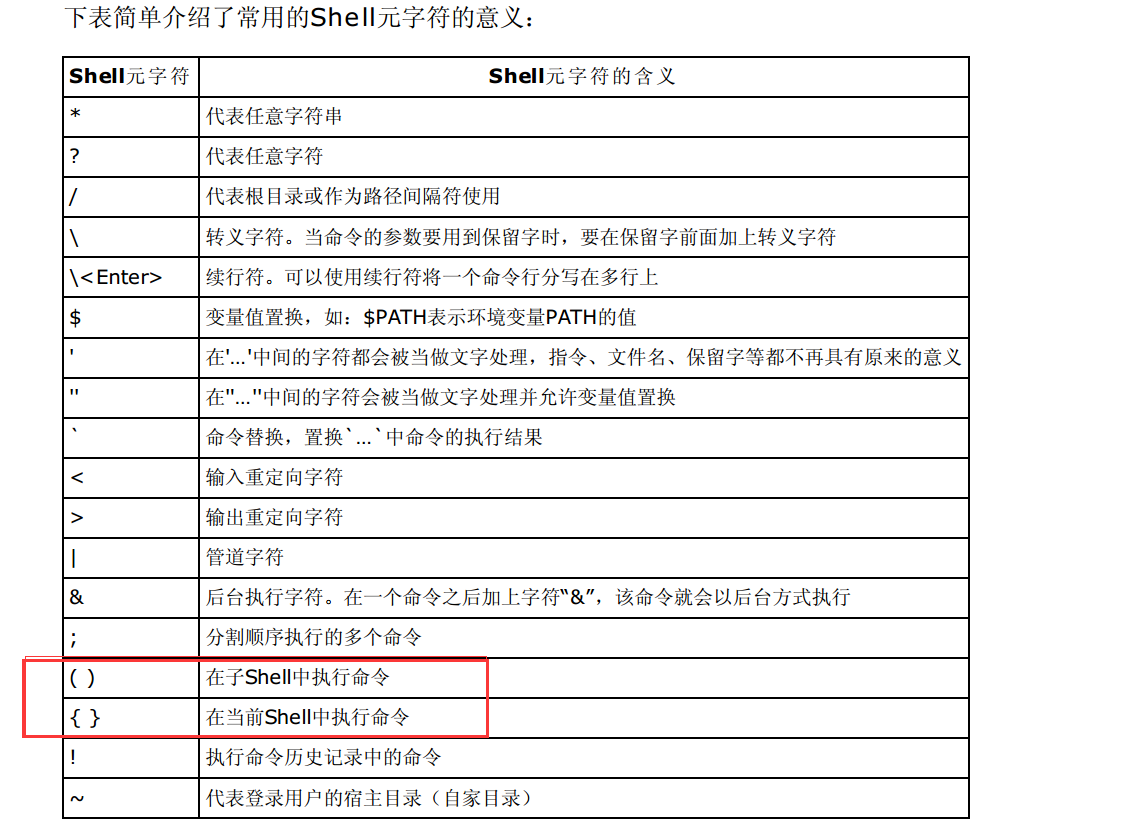
使用数组
#/bin/bash
projectID="$1"
for i in $(ls CFD/)
do
#将ls的输出赋值给数组
angle_array=($(ls CFD/$i/))
#使用数组的长度
length_array="${#angle_array[@]}"
if [ $length_array == 2 ]
then
echo "Actuator Disk Result exitst."
#遍历数组
for angle in "${angle_array[@]}"
do
path="/public1/home/sc30186/GOLDFOAM_projects/"$projectID"/CFD/"$i"/"$angle"/FINE"
echo "copy f2vtk.sh to $path"
cp f2vtk.sh $path/.
cd $path
sbatch -p v3_64  -N  1 f2vtk.sh
#返回上一个目录
cd -
done
fi
done
Shell 参数扩展
https://www.gnu.org/software/bash/manual/html_node/Shell-Parameter-Expansion.html
Script=$0
[ "/${Script#/}" != "$Script" ] && Script="$PWD/$Script"
美元字符提供了参数扩展,命令替换以及算术扩展。被扩展的参数名称或符号可以被大括弧括起来,以把被扩展的变量和紧跟它的字符区分开,避免把它们当成一个字符,当然这不是必须的。
当使用大括弧的时候,匹配的结尾大括弧是第一个没被反斜杠转义的”}”,或者在一个带引号的字符串中,也不是在嵌入的算术扩展、命令替换或者参数扩展中。 参数扩展的基本形式是_${parameter}。parameter_的值会被带入_。parameter_是shell参数或者数组的引用。当parameter是多于一位数的位置参数的或者后边还跟着不属于它名字的字符的时候,必须使用大括弧。 如果parameter的第一个字符是!,并且parameter不是nameref, 它引入了一个层次的指示。
管道(piping)
将一个命令的输出重定向到另一个命令
command1 | command2
将左边命令的输出当作右边命令的输入。
常用命令(learn by example)
grep
grep用于从众多大文件中查找数据,而不用打开每个文件查找,命令行的格式为:
grep [options] pattern [file]
-ri的意思是递归查找忽略大小写
grep -ri wingMotion
tree
tree [] [-I <范本样式>] [-P <范本样式>] [目录...]
- -P<范本样式> 只显示符合范本样式的文件或目录名称
man
NAME简要介绍这个命令的用途,SYNOPSIS列出了该命令能够理解的参数。所有可选的参数包含在[]中,可以相互替代的参数用|隔开,可以重复的参数后边跟着…。 The one-line description under NAME tells you briefly what the command does, and the summary under SYNOPSIS lists all the flags it understands. Anything that is optional is shown in square brackets […], either/or alternatives are separated by |, and things that can be repeated are shown by …, so head’s manual page is telling you that you can either give a line count with -n or a byte count with -c, and that you can give it any number of filenames.↳
cut 从文件中选择列
cut不能识别”“引起的字符串,如果字符串里有分隔符会把字符串分开。
grep根据包含的值选择行
- -c: print a count of matching lines rather than the lines themselves
- -h: do not print the names of files when searching multiple files
- -i: ignore case (e.g., treat “Regression” and “regression” as matches)
- -l: print the names of files that contain matches, not the matches
- -n: print line numbers for matching lines
- -v: invert the match, i.e., only show lines that don’t match 一般用于去除表头
wc (word count)
-c chracters -w words -l line
sort
默认情况下sort把数据根据字母升序排列,-n 按数字排列, -r 反顺序排列, -b 忽略开始的空行,-f忽略大小写。
uniq
去除重复的行 uniq只能去除相邻的重复行,因为uniq是为处理大文件而准备的,如果要去除不相邻的重复行,需要将整个文件的内容都存储在内存中,如果只去除相邻的重复行,内存中只需要存储相邻的不同行就行了。 Then **uniq **will print all four lines. The reason is that uniq is built to work with very large files. In order to remove non-adjacent lines from a file, it would have to keep the whole file in memory (or at least, all the unique lines seen so far). By only removing adjacent duplicates, it only has to keep the most recent unique line in memory. -c 统计出现的次数
sed
ll
相当于 ls -l,列出文件的详细信息,主要是用户权限